


Wink: Video Enhancer & Editor
4.51.69K Reviews
App Specs
- Version
- 3.17.5
- Updated On
- License
- Free
- Downloads
- 50,000,000+
- Developer
- Meitu (China) Limited
- Categories
- Video Players & Editors
- Platform
- Android, iOS
Screenshots
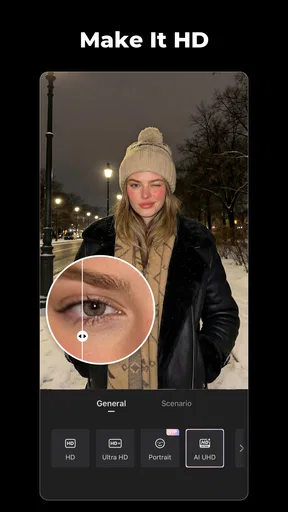
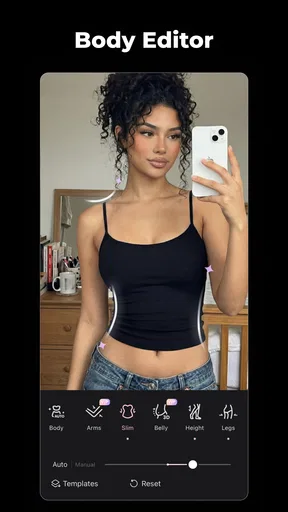
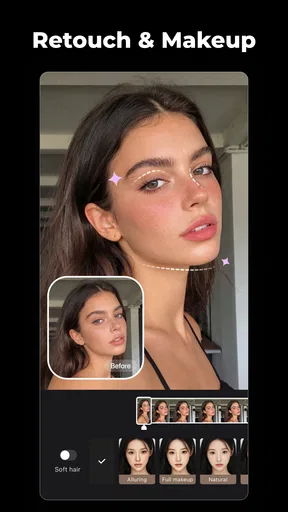
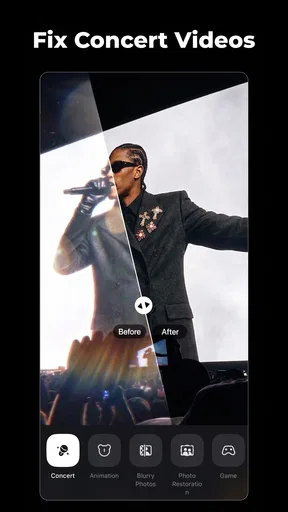
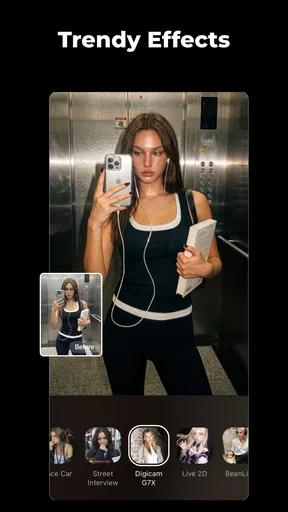
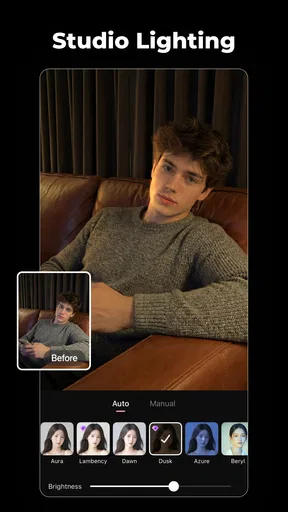
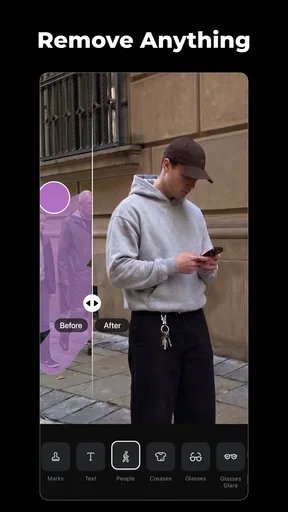
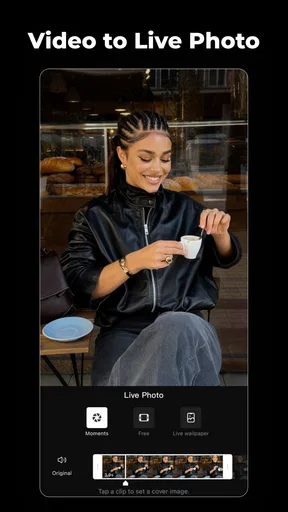
 Analysis by AppCompare
I judge a video editor less by how exciting it feels on the first day than by whether I would still open it a few weeks later. Wink: Video Enhancer & Editor makes a strong first impression because it brings enhancement and everyday editing into one mobile workspace. The more useful question is whether those tools fit a repeatable routine, rather than simply making a few clips look different for an afternoon.
Why the first week feels easy
Wink is a free video editing app from Meitu (China) Limited, and its focus on AI-assisted image treatment gives it a different first impression from a basic clip trimmer. Its store summary points to AI art and effects, along with retouching, so the appeal is not only arranging footage: it is also changing how the finished image looks. That combination is handy when I want a quick visual lift without moving a clip through several separate apps.
The first-week experience is best suited to experimentation. I can take a short phone video, try an enhancement, compare the result with a more restrained edit, and decide which version feels natural. The key is to treat automatic processing as a starting point, not a promise that every clip needs the strongest treatment. A dim indoor recording and a bright outdoor clip may benefit from different choices, and an effect that looks striking on one can feel excessive on the other.
That makes Wink especially approachable for casual creators who are still learning what they like. Rather than beginning with a long editing session, I can work on a short clip and focus on one decision at a time: improve the image, tidy the sequence, or give the result a particular mood. It is a friendlier way to learn than opening a desktop-style editor and facing a dense set of controls before I know what I want.
Where it fits into an everyday routine
A realistic use for me is cleaning up a quick family or weekend clip before sharing it with friends. I might trim away the seconds before the useful moment, make a modest visual adjustment, and check whether the result still looks like the scene I remember. That is a better test of lasting value than building an elaborate montage: if a small edit saves me time often, the app earns a regular place on my phone.
Wink is also worth considering when a short social post needs a little more polish but not a full production workflow. The most reliable approach is to keep a clean original, make one clear change at a time, and review the whole clip before exporting. That simple habit helps me spot when an effect is uneven or when an edit that looked good on a single frame distracts across the complete video.
Its practical audience is therefore not limited to people who call themselves editors. It can suit someone who records occasional clips and wants to improve them on a phone, as well as a frequent poster who values visual experimentation. If I need precise control over a complex timeline, detailed audio mixing, or a tightly managed production process, though, I would compare it with a more specialist editor before settling on it.
Worth Reading Before You Choose

Switching to Android Auto Means Rethinking Your Driving Routine

Google Calendar Makes a Crowded Week Easier to Manage

Baby Panda World Brings Quick Play to Modern Phones, but Its Game Library Feels Busy

ESPN’s Live Game View Makes Following Close Games Easier

QuizzLand Review: A Good Fit for Short Trivia Breaks, Not Every Player

Basketball Stars: Multiplayer Is Fast, but Can It Recover When Matches Go Wrong?
How Wink holds up beyond the novelty
I look at Wink’s lasting appeal through the small decisions that come with editing regularly: whether its visual tools help with ordinary clips, whether I can keep a consistent look, and whether the extra choices feel worth managing. A useful test is to revisit the same kind of everyday footage after the first experiments, not just the most exciting clip. That makes it easier to tell which parts of the workflow have become a habit and which were only novelty.
Features That Stand Out
Alright, let’s dive into the juicy part—the features. Wink isn’t just your run-of-the-mill video editor; it packs some serious punch with its video enhancement tools. One of my favorite features is the AI-powered enhancement, which can automatically adjust and enhance your video’s quality. It’s like having a personal video editing assistant that knows exactly what your footage needs.
Besides the AI magic, Wink offers a plethora of editing tools. You can trim, cut, and merge clips with ease. The transitions are smooth, and there’s a variety to choose from, ensuring your videos flow seamlessly from one scene to the next.
Oh, and let’s not forget about the filters. Wink boasts a wide range of filters that add a professional touch to your videos. Whether you’re going for a vintage look or a modern vibe, there’s something for everyone. I played around with a few and was genuinely impressed with how they transformed the overall aesthetic of my videos.
Audio and Music
No video is complete without the perfect soundtrack, right? Wink gets this, and they’ve provided an extensive music library to choose from. You can also import your own tracks if you prefer something more personal. The app makes it super easy to sync your music with your video, allowing you to create the perfect mood for your audience.
Additionally, if you need to add narration or voiceovers, Wink has got you covered. The audio recording feature is straightforward, making it a breeze to add your voice to your creations.
Exploring the Advanced Tools
For those who love to get into the nitty-gritty, Wink offers some advanced editing tools that are worth exploring. You can adjust brightness, contrast, and saturation manually, giving you full control over the visual output. I found the color correction tools particularly useful for tweaking the look of my outdoor shots.
If you’re into creating content for social media, you’ll appreciate Wink’s ability to export videos in various formats and resolutions. It ensures your videos look pristine whether they’re viewed on a phone or a larger screen.
What repeated use really asks of you
To make the app useful month after month, I would build a small, repeatable process instead of reopening every creative choice for every clip. First, decide whether the footage needs correction or a stylized look; then trim it; only after that add music or narration. Separating those decisions makes it easier to notice which step is improving the video and which is just adding decoration.
One less obvious trade-off with AI enhancement is that consistency matters more than intensity when several clips will appear together. If I process each shot differently, a sequence can feel visually jumpy even if every individual clip looks appealing on its own. For a short event recap, I would test the treatment on one representative shot first, then use a similar level across the rest rather than chasing the most dramatic result clip by clip.
Manual brightness, contrast, and saturation controls are useful for this reason: they give me a way to make restrained corrections when an automatic look feels too strong. I would also keep the original footage until I have checked the edited version on the screen where I plan to watch or share it. Small changes can read differently on a phone than they do while I am focused on the editing screen.
For music-led clips, I would settle the picture edit before choosing a soundtrack. Otherwise, I can end up reshaping the video around a song and then having to redo trims when the mood does not fit. If I am recording a voiceover, I would listen through the complete result once before sharing, paying attention to whether speech remains clear under the music. These checks are simple, but they turn a collection of effects into a more considered edit.
Maintenance, cost, and limits
The app’s basic price is free, which makes it easy to try without committing to a purchase. It also offers in-app purchases ranging from $0.99 to $79.99 per item, so I would check what a particular tool or item costs before relying on it for a recurring workflow. A sensible way to decide is to make a few ordinary edits first and see whether the features I actually use are available on terms I find worthwhile, rather than paying because a first experiment looks impressive.
Wink has a 4.5 average from around 805,000 ratings, with more than 10 million installs. Those figures suggest broad interest, but they do not tell me whether its approach suits my own footage or editing habits. Its content rating is Teen, and the current version is 3.0.5; Android users need version 8.0 or later. The app was released on December 21, 2021, so this is not a new arrival whose appeal rests only on launch-day curiosity.
The maintenance burden is less about complicated editing knowledge than about being selective. A phone can fill up with alternate exports if I save every experiment, so I would keep the original and the version I intend to share, then remove unwanted drafts when I am done. I would also avoid treating cloud access or direct sharing as a substitute for keeping a copy I can find later. For an occasional creator, a clear naming habit and a quick check of saved files can prevent a finished clip from getting lost among test versions.
There are limits to the all-in-one convenience. A mobile editor can be comfortable for short videos, but people who routinely need fine-grained timeline work, detailed sound control, or a dependable project handoff may prefer a more specialized tool. Likewise, someone who wants faithful, natural-looking footage may not enjoy spending time on AI effects and filters. Wink makes the most sense when visual enhancement is part of the task, not when I simply need the most neutral and technically controlled edit.
When another kind of editor is a better fit
Compared with a basic editor, Wink’s draw is the extra emphasis on image enhancement, retouching, and visual effects. That makes it more inviting when a clip feels flat and I want to explore a few looks while trimming it. A simple cutter is still the better choice if my only job is removing the start and end of a video; in that case, extra creative options may add decisions without saving time.
At the other end, a more advanced editor is a better match when a project depends on precise sequencing or a lot of detailed adjustments. I would not choose Wink just because it has several tools: the right editor is the one that handles the work I repeat. For a quick post made from a handful of phone clips, Wink’s combination can be convenient. For a longer project with demanding sound or a carefully coordinated edit, I would start with software built around that level of control.
It is also not the right choice for everyone who posts online. If I care more about a consistent, unfiltered record than a polished look, I would leave the video alone or make only a basic correction. If I enjoy trying different styles and can stop before the image becomes overworked, the effects are a genuine creative outlet. The difference comes down to whether I want the app to help preserve a moment or reinterpret it.
Sharing Your Masterpiece
Once your masterpiece is ready, Wink makes sharing a breeze. You can directly upload your videos to popular platforms like YouTube, Instagram, or Facebook without ever leaving the app. This integration saves time and effort, and let’s face it, we all love convenience!
Moreover, the app allows you to save your projects in the cloud, so you can access and edit them from any device. It’s a thoughtful feature that ensures your creativity isn’t bound by a single device.
Before sharing, I would watch the exported video from beginning to end rather than judging it from the editing preview alone. That final pass catches abrupt cuts, a filter that changes the feel of one shot, or music that competes with narration. If the clip is meant for a particular platform, I would also check that the framing and pacing suit the way I expect people to watch it; a polished look cannot compensate for a crop that hides the important part of the scene.
Who is likely to keep using it?
I can see Wink earning a lasting place with people who make short, informal videos and enjoy giving them a deliberate visual finish. Its appeal is strongest when I want enhancement and straightforward editing in the same mobile session, and when trying a few looks is part of the fun rather than a chore. It is less compelling for someone who edits only once in a while and wants the fewest possible decisions, or for a creator whose work depends on controls beyond a casual phone workflow.
The app is available free, though individual in-app purchases can range from $0.99 to $79.99. That wide spread makes it worth being deliberate: I would first identify the specific tool I expect to use repeatedly, then decide whether its cost makes sense for that habit. A one-off effect is harder to justify than a feature that genuinely saves time on the kinds of clips I make every week.
Final Thoughts
In conclusion, Wink: Video Enhancer & Editor is a fantastic tool for anyone looking to enhance their video editing game. Whether you’re a beginner or a seasoned pro, the app offers something for everyone. Its user-friendly interface, powerful editing tools, and seamless sharing capabilities make it a standout choice in the crowded world of video editing apps.
So, if you’re ready to transform your videos with ease and creativity, give Wink a try. You might just find it becoming your go-to app for all things video editing!
My long-term verdict is more measured: I would keep Wink if I regularly wanted to improve the look of short clips, and if its visual choices stayed useful after the first burst of experimentation. The best way to find out is to edit a normal, unremarkable video rather than a special occasion clip; ordinary footage reveals whether the workflow is convenient enough to repeat. If I mostly need precise production controls or quick trimming with no styling, I would choose a different kind of editor. For casual creators who like an image-led finish, however, Wink offers enough room to develop a personal routine without demanding that every video become a major project.
Pros
- Intuitive user interface for easy editing.
- Wide range of video filters and effects.
- Supports high-resolution video exports.
- Quick processing with minimal lag.
- Seamless integration with social media platforms.
Cons
- Limited free features; many require purchase.
- Occasional ads can interrupt workflow.
- Some advanced tools aren't beginner-friendly.
- Requires stable internet for cloud features.
- Large app size may impact device storage.
FAQs for Wink: Video Enhancer & Editor
What features does Wink: Video Enhancer & Editor offer?
Wink provides a suite of powerful editing tools including filters, transitions, and advanced video enhancements. Users can adjust brightness, contrast, and saturation, as well as add text and music to their videos. The app also supports multiple video formats and resolution settings, making it versatile for different editing needs.
Is Wink: Video Enhancer & Editor user-friendly for beginners?
Yes, Wink is designed with an intuitive interface that makes it easy for beginners to navigate. The app offers tutorials and guides for new users, ensuring that even those with no prior editing experience can quickly learn to enhance and edit videos like a pro.
Can I use Wink: Video Enhancer & Editor on both Android and iOS devices?
Wink is available for both Android and iOS platforms. Users can download it from the Google Play Store or the Apple App Store. The app is optimized for performance on a variety of devices, ensuring a smooth editing process across different operating systems.
Does Wink: Video Enhancer & Editor require an internet connection?
Wink can be used offline for most of its editing features. However, an internet connection is required for downloading the app, accessing cloud storage options, and downloading additional content such as music tracks and filters from the app’s library.
Are there any in-app purchases in Wink: Video Enhancer & Editor?
Yes, Wink offers in-app purchases. While the basic version of the app is free, users can purchase additional features such as premium filters, advanced editing tools, and ad-free experiences. These optional purchases enhance functionality but are not required for basic video editing.


